

Home Office WiFi Setup Dubai | Reliable Internet
Posted 2 months ago ID Number 566
1 AED
Description
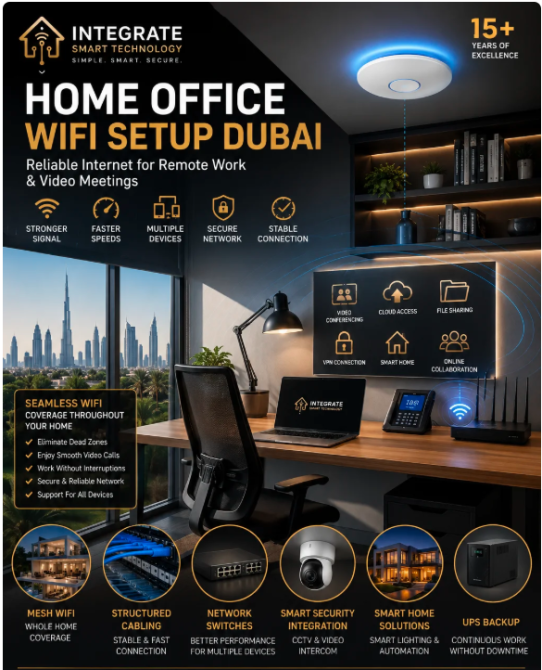
The way people work has changed dramatically over the past few years. Remote work, hybrid work models, virtual meetings, cloud applications, and digital collaboration have become a normal part of everyday business. Whether you’re a business owner, entrepreneur, freelancer, consultant, or corporate employee, having a dependable home office WiFi network is no longer a luxury—it’s a necessity.
Unfortunately, many home offices are still relying on standard internet routers that were never designed to handle multiple high-bandwidth devices, video conferencing, cloud storage, VPN connections, smart home systems, and simultaneous streaming. The result is slow internet speeds, dropped video calls, weak WiFi signals, and reduced productivity.
At Integrate Smart Technology, we specialize in designing professional home office WiFi solutions across Dubai and the UAE. Our engineers create customized wireless networks using enterprise-grade Mesh WiFi systems, wireless access points, structured cabling, and advanced network optimization to ensure your workspace remains fast, secure, and reliable throughout the day.
Whether your home office is in a luxury villa, apartment, townhouse, or penthouse, we provide tailored solutions that eliminate dead zones, improve internet stability, and support the growing number of connected devices used in modern homes.
Why a Reliable Home Office Network Matters
Your internet connection has become the backbone of your professional life. Every email sent, video meeting attended, cloud file accessed, and online collaboration session depends on a stable and secure network.
A poorly designed WiFi network can lead to:
Interrupted Zoom or Microsoft Teams meetings
Slow file uploads and downloads
Delayed access to cloud applications
VPN disconnections
Buffering during presentations
Reduced productivity
Poor communication with clients and colleagues
Frustration caused by unreliable connectivity
Investing in a professionally designed home office network helps eliminate these issues and creates a workspace where technology supports your productivity rather than slowing it down.
Common WiFi Problems That Affect Remote Work
Many homeowners assume slow internet is caused by their internet service provider. In reality, the issue is often related to the way the wireless network is designed inside the property.
Weak WiFi Signals
If your home office is located upstairs, in a separate room, or at the far end of the property, the wireless signal may weaken before reaching your workspace.
This often results in unstable connections and fluctuating internet speeds.
Poor Router Placement
Routers installed inside cabinets, behind televisions, near electrical equipment, or in one corner of the house cannot provide even coverage throughout the property.
Professional placement significantly improves wireless performance.
Too Many Connected Devices
Modern households may have more than 50 connected devices, including:
Smartphones
Laptops
Tablets
Smart TVs
Streaming devices
Gaming consoles
CCTV cameras
Video door phones
Smart lighting
Smart speakers
Home automation systems
Printers
Smart appliances
As more devices connect, consumer-grade routers often struggle to maintain consistent performance.
Wireless Interference
Nearby WiFi networks, Bluetooth devices, microwave ovens, and other wireless electronics can interfere with your connection, reducing speed and stability.
Professional channel optimization helps minimize interference and improve overall performance.
Signs Your Home Office Needs a WiFi Upgrade
If you regularly experience any of the following issues, your home office network may benefit from a professional upgrade:
Video meetings freeze or disconnect
Slow cloud backups
Delayed email synchronization
Poor VPN performance
WiFi signal drops in your office
Buffering while sharing presentations
Smart devices disconnect frequently
Slow internet despite a high-speed package
Multiple users competing for bandwidth
Dead zones around the property
Rather than continually upgrading your internet plan, improving your wireless infrastructure often delivers far better results.
Mesh WiFi vs. Single Router: Which Is Better for a Home Office?
Many homes still rely on a single router supplied by the internet service provider. While this may be adequate for smaller apartments, it often fails to provide reliable coverage in larger homes or multi-storey villas.
Single Router
A single router works best in compact spaces with minimal obstacles. However, signal strength decreases as you move farther away, especially through concrete walls or multiple floors.
Limitations include:
Uneven coverage
Weak signal in distant rooms
Reduced speeds
Limited support for multiple devices
Poor roaming performance
Mesh WiFi
Mesh WiFi systems use multiple interconnected nodes to create one seamless wireless network throughout the property.
Advantages include:
Strong WiFi in every room
Automatic roaming between nodes
Better supp
Unfortunately, many home offices are still relying on standard internet routers that were never designed to handle multiple high-bandwidth devices, video conferencing, cloud storage, VPN connections, smart home systems, and simultaneous streaming. The result is slow internet speeds, dropped video calls, weak WiFi signals, and reduced productivity.
At Integrate Smart Technology, we specialize in designing professional home office WiFi solutions across Dubai and the UAE. Our engineers create customized wireless networks using enterprise-grade Mesh WiFi systems, wireless access points, structured cabling, and advanced network optimization to ensure your workspace remains fast, secure, and reliable throughout the day.
Whether your home office is in a luxury villa, apartment, townhouse, or penthouse, we provide tailored solutions that eliminate dead zones, improve internet stability, and support the growing number of connected devices used in modern homes.
Why a Reliable Home Office Network Matters
Your internet connection has become the backbone of your professional life. Every email sent, video meeting attended, cloud file accessed, and online collaboration session depends on a stable and secure network.
A poorly designed WiFi network can lead to:
Interrupted Zoom or Microsoft Teams meetings
Slow file uploads and downloads
Delayed access to cloud applications
VPN disconnections
Buffering during presentations
Reduced productivity
Poor communication with clients and colleagues
Frustration caused by unreliable connectivity
Investing in a professionally designed home office network helps eliminate these issues and creates a workspace where technology supports your productivity rather than slowing it down.
Common WiFi Problems That Affect Remote Work
Many homeowners assume slow internet is caused by their internet service provider. In reality, the issue is often related to the way the wireless network is designed inside the property.
Weak WiFi Signals
If your home office is located upstairs, in a separate room, or at the far end of the property, the wireless signal may weaken before reaching your workspace.
This often results in unstable connections and fluctuating internet speeds.
Poor Router Placement
Routers installed inside cabinets, behind televisions, near electrical equipment, or in one corner of the house cannot provide even coverage throughout the property.
Professional placement significantly improves wireless performance.
Too Many Connected Devices
Modern households may have more than 50 connected devices, including:
Smartphones
Laptops
Tablets
Smart TVs
Streaming devices
Gaming consoles
CCTV cameras
Video door phones
Smart lighting
Smart speakers
Home automation systems
Printers
Smart appliances
As more devices connect, consumer-grade routers often struggle to maintain consistent performance.
Wireless Interference
Nearby WiFi networks, Bluetooth devices, microwave ovens, and other wireless electronics can interfere with your connection, reducing speed and stability.
Professional channel optimization helps minimize interference and improve overall performance.
Signs Your Home Office Needs a WiFi Upgrade
If you regularly experience any of the following issues, your home office network may benefit from a professional upgrade:
Video meetings freeze or disconnect
Slow cloud backups
Delayed email synchronization
Poor VPN performance
WiFi signal drops in your office
Buffering while sharing presentations
Smart devices disconnect frequently
Slow internet despite a high-speed package
Multiple users competing for bandwidth
Dead zones around the property
Rather than continually upgrading your internet plan, improving your wireless infrastructure often delivers far better results.
Mesh WiFi vs. Single Router: Which Is Better for a Home Office?
Many homes still rely on a single router supplied by the internet service provider. While this may be adequate for smaller apartments, it often fails to provide reliable coverage in larger homes or multi-storey villas.
Single Router
A single router works best in compact spaces with minimal obstacles. However, signal strength decreases as you move farther away, especially through concrete walls or multiple floors.
Limitations include:
Uneven coverage
Weak signal in distant rooms
Reduced speeds
Limited support for multiple devices
Poor roaming performance
Mesh WiFi
Mesh WiFi systems use multiple interconnected nodes to create one seamless wireless network throughout the property.
Advantages include:
Strong WiFi in every room
Automatic roaming between nodes
Better supp
Location
Dubai Creek Harbour, Dubai

Joined on May 2026
Was online 23 july 16:29
Is there any Issues?
Complain
Listing №566 Created 2 months ago
Similar Listings





WEBSITES TECHNICAL SUPPORT
799 AED

Websites Improvement
499 AED